
Smart Customer Satisfaction Surveys: How Conditional Fields Turn a Form into a Strategic Tool
If you were to call a customer and say, “Before we wrap up, I’m going to ask you 12 questions in a row,” chances are they’d try to end the call quickly.
But if you started with one simple question: “How satisfied were you with the service?” listened to the answer, and only then asked follow-up questions based on that response, the conversation would feel completely different.
That’s exactly the difference between a static survey and a smart survey with conditional fields.
Instead of every customer going through the same fixed path, a smart customer survey behaves like a great service representative: it asks → listens → and dives deeper only where needed.
The common mistake in customer satisfaction surveys
Many businesses try to ask everything about the service, the product, the delivery, the website, the price, and the representative. The result?
A long customer satisfaction survey, high drop-off rates, and rushed, inaccurate answers.
A good customer satisfaction survey doesn’t need to be longת, it needs to be smart. That’s where conditional fields and dynamic surveys come in.
What Are conditional fields in a survey?
Conditional fields are questions that appear or disappear based on a previous answer.
In other words:
If the customer selects a certain response relevant follow-up questions are shown,
If not, those questions won’t appear at all.
In practice, the customer doesn’t feel like they’re filling out a long form, they feel like they’re being listened to.
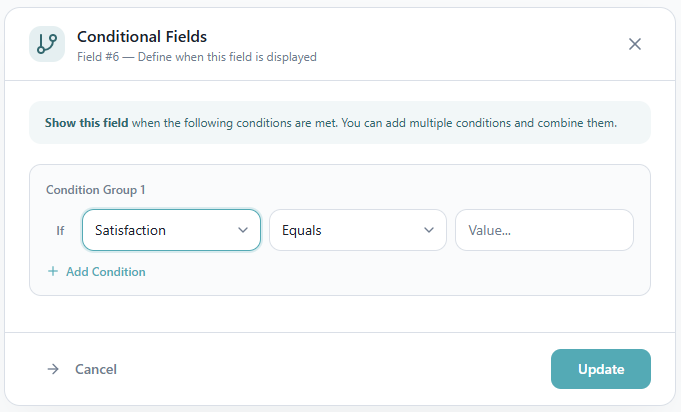
How conditional fields work in a customer satisfaction survey
Let’s say the first question in your customer satisfaction survey is:
“How satisfied are you with the service you received?” (rating 1–5)
A customer who rated 5, possible follow-up questions: Would you recommend us to others?
Would you be willing to rate us on Google? (with a link). Are there additional services you’re interested in?
In this case, you’re reinforcing strengths and even opening opportunities for reviews, testimonials, or upsells.
A customer who rated 1, now the approach changes: What didn’t meet your expectations?
At which stage did you experience difficulties? Would you like a representative to contact you?
Here, the goal is resolution and improvement, not marketing.
Benefits of using conditional fields in customer satisfaction surveys
Less friction = higher response rates
Most customers won’t spend five minutes on a long survey. But when they’re only asked relevant questions, the survey feels shorter and effortless.
More accurate customer feedback
An unhappy customer will share what went wrong, if given the opportunity to elaborate on their experience.
A satisfied customer, on the other hand, can provide testimonials, success stories, and may be open to additional services.
This is how survey optimization works in practice, turning feedback into real business decisions.
Better customer experience
Smart surveys feel personalized. Customers are more engaged when questions are relevant to them.
Real-Time Actions Based on Survey Responses
The real power of a smart customer satisfaction survey isn’t just in collecting data, it’s in what you do with it.
You can define automation logic such as:
Low rating → automatically open a support ticket
High rating → add to a testimonial or review request list
Interest in another product → route directly to the sales team
This is where customer feedback becomes operational, not just analytical.
Smart ways to use conditional logic in surveys
Customer type personalization
Private or business customer?
How many employees are in your organization?
Based on the answers, show entirely different question paths.
Post-purchase surveys
If delivery was marked as slow – ask only about logistics.
If the product didn’t meet expectations – dig into the gap between promise and experience.
Turning feedback into opportunity
If a customer indicates high satisfaction – Would you like to hear about more advanced services?
Which areas are relevant to you?
Based on the answers, present tailored service packages or content.
Event registration with multiple tracks
Someone choosing a “Management track” will see different questions than someone choosing a “Technology track.”
Smart quote request forms
Start with: What type of service are you looking for? How many customers does your business have?
Only then reveal relevant follow-up questions like budget, timeline, or scope.
How to create a smart customer satisfaction survey with conditional logic
Start with logic, not with fields.
First, identify the core question everything branches from.
Ask yourself: Which answers require deeper exploration? When is action needed? Where can you leverage opportunity?
Then build your survey like a decision tree:
question → branch → targeted follow-up
The goal of survey optimization isn’t to ask more, it’s to understand better.
In Summary
Conditional fields turn a customer satisfaction survey from a uniform, boring form into a smart, dynamic survey that truly listens.
They improve the customer experience, increase response rates, and most importantly, deliver high-quality, actionable insights.
That’s the difference between simply sending a survey and actually learning from your customers.


